Learn / Infrastructure and deployment
CI/CD as the default
Lesson 21 of 37 · 8 min read ·
The two halves
CI (continuous integration) — every push is built and tested automatically. The point is fast feedback: you learn within minutes that your change broke something, while the change is still in your head.
CD is two different things people conflate. Continuous delivery means every green build is deployable and shipping is one button. Continuous deployment means every green build ships automatically. The first is a prerequisite for the second, and most teams should stop at the first until their test suite genuinely deserves the trust.
What belongs in the pipeline
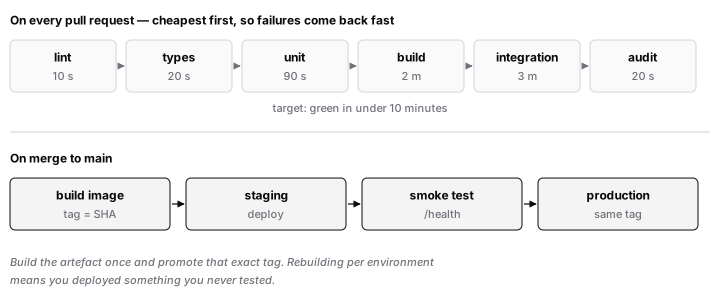
On every pull request, in this order — cheapest and most likely to fail first:
- Lint and format check (seconds)
- Type check (seconds)
- Unit tests (a minute or two)
- Build (a few minutes)
- Integration tests against real dependencies in containers
- Security scan — dependency audit plus secret scanning
On merge to main: build the artefact once, tag it with the commit SHA, deploy to staging, run smoke tests, then deploy to production.
Build once, deploy many. The exact artefact tested in staging is the one that goes to production. Rebuilding per environment means you deployed something you never tested. Configuration comes from the environment, not from the build.
Speed is a correctness feature
A pipeline that takes 45 minutes will be worked around. People batch changes, skip CI locally, merge on a hunch, and use --no-verify. The tooling stops being a safety net and becomes an obstacle.
Under ten minutes to a green PR is the target. Levers: cache dependencies between runs, run independent jobs in parallel, run the slow end-to-end suite on merge rather than on every push, and split test suites across runners.
Flaky tests are worse than missing tests. A suite that fails 5% of the time for no reason teaches everyone to re-run rather than investigate — and the day it catches a real bug, it gets re-run too. Quarantine flaky tests immediately and fix them or delete them. Do not let them sit red.
Deployment strategies
- Rolling — replace instances a few at a time. The default; means two versions run simultaneously, so your changes must be backward compatible for the duration.
- Blue-green — run a full second environment, switch traffic at once, keep the old one warm. Instant rollback, double the infrastructure during a deploy.
- Canary — send 5% of traffic to the new version, watch error rates and latency, then ramp. The best risk-to-cost ratio, and it needs observability good enough to tell you within minutes whether the canary is unhealthy.
Decouple deploy from release with feature flags. Ship the code dark, enable it for internal users, then a percentage, then everyone. Now a bad feature is a config change to disable, not a rollback.
The rollback nobody tests
"We can always roll back" is a claim, not a capability, until you have done it. Rehearse it in staging and time it.
The hard part is almost never the code — it is the database. A migration that dropped a column cannot be rolled back by redeploying the old binary. This is why migrations use expand and contract: add the new column, deploy code that writes both, backfill, switch reads, and only drop the old column in a later release, once you are certain you will not roll back past it. Every deploy must be safe with both the old and the new schema present.
Gotchas
- Secrets belong in the CI provider's secret store, never in the workflow file. Pull requests from forks must not receive them.
- Pin your action and image versions.
@v4moving under you is a supply-chain risk. - Make main protected: no direct pushes, required green checks.
- Notify on failure to a place people actually look, or red builds become normal.
- Deploy in small increments. Small deploys fail small.
Prove you know it
Time your pipeline from push to green. Then roll back your last production deploy in a staging environment and time that too. If either number surprises you, that is the thing to fix first.