Learn / Infrastructure and deployment
Containers, properly
Lesson 20 of 37 · 9 min read ·
What a container actually is
A container is not a lightweight VM. It is a normal Linux process on the host kernel, with three kernel features applied to it:
- Namespaces — what the process can see. Separate namespaces for PIDs (its processes start at PID 1 and it cannot see yours), network (its own interfaces and ports), mount (its own filesystem view), users, hostname and IPC.
- cgroups — what the process can use. CPU shares, memory limits, I/O bandwidth. This is what stops one container starving the host.
- A union filesystem — layered, copy-on-write images.
Run ps aux on the host and you will see the containerised process listed like any other. There is no guest kernel, which is why containers start in milliseconds and VMs take tens of seconds. It is also why the isolation is weaker: a kernel vulnerability crosses container boundaries in a way it cannot cross a hypervisor.
Layers, and why your Dockerfile is slow
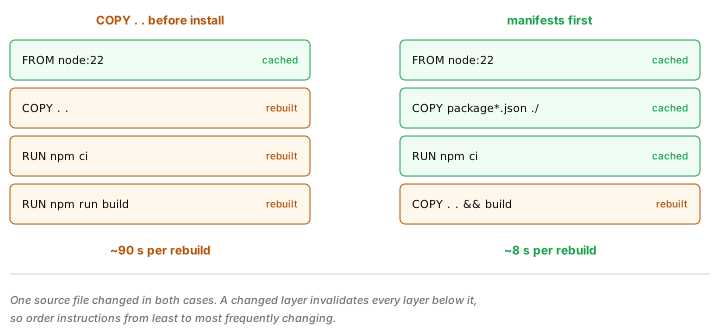
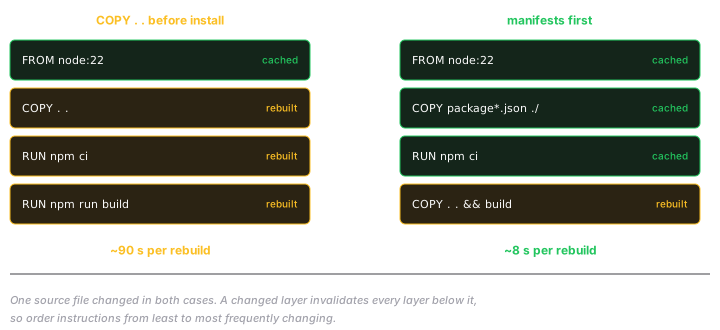
Every instruction in a Dockerfile creates a layer. Layers are cached and content-addressed, and a change to one layer invalidates every layer after it.
That single fact explains the most important Dockerfile rule:
# Slow: any source change reinstalls every dependency
COPY . .
RUN npm ci

# Fast: dependencies only reinstall when the manifest changes
COPY package*.json ./
RUN npm ci
COPY . .
Order instructions from least to most frequently changing. Your source changes on every commit; your dependencies change weekly.
Layers are also permanent. A file added in one layer and deleted in a later one is still in the image, and still extractable. Deleting a secret in a subsequent RUN does not remove it — it just hides it from ls. Use multi-stage builds or build secrets instead.
Multi-stage builds
Build with a full toolchain, ship only the artefact:
FROM node:22 AS build
WORKDIR /app
COPY package*.json ./
RUN npm ci
COPY . .
RUN npm run build

FROM node:22-slim
WORKDIR /app
COPY --from=build /app/dist ./dist
COPY --from=build /app/node_modules ./node_modules
USER node
CMD ["node", "dist/server.js"]
Compilers, dev dependencies and build caches stay in the discarded stage. Smaller images pull faster, deploy faster, and have a smaller attack surface — fewer packages means fewer CVEs.
Things that bite
- PID 1 does not handle signals like a normal process. If your app is PID 1 and ignores
SIGTERM, the orchestrator waits its grace period and thenSIGKILLs you, dropping in-flight requests. HandleSIGTERM, drain connections, exit. Use--initortiniif your process spawns children. - Containers are ephemeral. Anything written to the container filesystem disappears on restart. Logs go to stdout; state goes to a volume or a database.
- Set memory limits, and tell the runtime. A JVM or Node process that thinks it has the host's full RAM will size its heap accordingly and get OOM-killed. See memory and GC.
latestis not a version. Pin the tag, ideally the digest, or your build is not reproducible.- Do not run as root. Add a
USERline. The default is root, and a container escape from root is much worse. .dockerignore. Without it you are copyingnode_modules,.gitand possibly.envinto the build context and often into the image.
Prove you know it
Take a Dockerfile you have written and answer three things: how long a rebuild takes when only source changed (if dependencies reinstall, fix the layer order), what user the process runs as, and what happens to an in-flight request when the container gets SIGTERM. Then check the image size before and after a multi-stage rewrite.